
Online metronome
Set the tempo, pick the beats in your bar, press start. Free, in your browser, nothing to install. For more free features, see what the app does and get it on Google Play. iOS coming soon.
Press start, or hit the space bar.

It will keep good time for as long as this tab is in front of you. That is the honest limit of a click in a browser, and it is why the rest of this page exists: what a page does well, where it lets go, and what to look for in whatever you end up practising with.
If you are here to measure a tempo rather than play one, that part works in a browser too and it is on the front page of this site.
Where a browser metronome holds up
For a minute of work with the tab in front of you, the click above is accurate. Web Audio schedules sound on its own clock rather than on the timer that runs the page, so each beat is handed over early and lands where it was put, within a millisecond or so. That is far below what anyone hears as wrong.
Checking a tempo, setting a feel before you record, giving a student a pulse for eight bars: all fine.
Where it lets go
| Situation | What happens |
|---|---|
| You switch tabs | Background tabs are throttled on purpose, to save battery. Timers slow down, and a click scheduled naively arrives late or not at all. |
| The screen sleeps | On a phone, the page stops. There is a wake lock, it is not universally supported, and it is a battery decision you did not make. |
| A call comes in | Audio focus goes elsewhere and does not reliably come back. |
| You are in a basement | A page you cannot load is not a metronome. Rehearsal rooms are frequently basements. |
| Bluetooth headphones | 100–200 ms of latency on any route. That is a problem for a metronome specifically, because you are playing against it rather than listening to it. |
The first of those you can watch happen. Start the click above, switch to another tab for half a minute, then come back: if beats were lost while you were away, it will tell you how many. On some desktops it survives; on a phone it rarely does.
None of this is a browser being badly made. A page is a guest on your device, and the rules that keep a hundred open tabs from flattening a battery are the same rules that stop one of them clicking for an hour.
What to look for in a metronome
- Time signatures past four fourA waltz is not a four with a beat missing, and seven-eight is not four plus three unless you say so. Anything that only counts to four will teach you to count wrong.
- SubdivisionsEighths, triplets, sixteenths and a swing feel against the same pulse. This is most of what a metronome is actually for once you are past keeping time.
- Accents you can moveThe mark belongs wherever the exercise needs it, which is not always beat one. Practicing with the accent on two and four is a different skill from practicing with it on one.
- A count-inSo you begin with the tempo instead of catching up to it in the first bar.
- Background playbackScreen off, phone in a pocket, click still going. This is the one that separates an app from a page.
- A tempo trainerRaises the click a few BPM every few bars, so you find the speed where it falls apart instead of guessing where it is.
- A practice timerStops itself after a set number of bars or minutes, which turns "I'll practice for a bit" into a block with an end.
Tempo as a starting point
If you are setting a metronome to work on a piece, start below the recording, at the speed where you get it right every time rather than the speed you wish you were at, and move up in small steps. For a sense of where a style usually sits, BPM by genre lists the range for about forty of them.
The metronome in BPMcountR
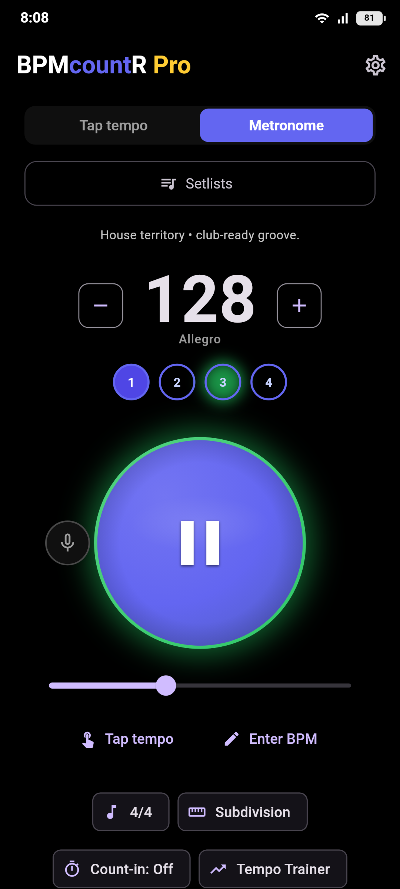
The click at the top of this page does two of the seven above: a tempo, and the beats in a bar. The metronome in the app does the list — time signatures, accent patterns, subdivisions with a swing feel, a count-in, and it keeps playing with the screen off and the phone in flight mode. The metronome itself is free, with its time signatures, accents and background playback. The subdivisions, the count-in, the trainers and the practice timer are the Pro part.
BPMcountR — Tap BPM & Metronome
The metronome is free, with no ads and no account. Pro is a one-time €9.99.
Common questions
Is there a metronome on this site?
Yes, at the top of this page. Set a tempo, pick the beats in your bar and press start; it is free and needs no account. What it cannot promise is to keep clicking once you switch tabs or your screen sleeps, because a browser tab is a guest on your device and those are the rules it lives under. BPMcountR is a metronome app for Android, and the metronome in it is free too.
Why does a browser metronome drift?
Because a background tab is throttled on purpose. Browsers slow down timers in tabs you are not looking at, to save battery, so a click scheduled by an ordinary timer arrives late or not at all. Web Audio can schedule ahead accurately enough to avoid this while the tab is in front, which is why a browser metronome is usually fine for thirty seconds and unreliable for thirty minutes.
What should a metronome be able to do?
Time signatures beyond four four, so a waltz or a seven-eight actually counts right. Subdivisions, so you can practice eighths and triplets against the same pulse. Accents you can move, because the first beat is not always the one you need marked. A count-in, so you start with the tempo rather than catching up to it. And it must keep playing with the screen off, which is where most of them stop.
What tempo should I practice at?
Slower than the recording, at the speed where you play it right every time, then move up in small steps. Somewhere between 60 and 80 BPM is where most technical work happens, whatever the piece ends up at. A tempo trainer does the stepping for you, raising the click a few BPM every few bars so you find your ceiling instead of guessing at it.
Does a metronome need an internet connection?
An online one does, every time you use it. That is worth thinking about before a rehearsal, because rehearsal rooms are frequently basements and basements frequently have no reception. An app loads once and then does not care.
Related: tap a tempo in the browser, BPM by genre, and the delay time calculator.